Table of Contents
Newsletter Integration
 Updated
by Matthias Heicke
Updated
by Matthias Heicke
Newsletter Integration in Sweap
With our newsletter integration, you can collect your guests' consent to newsletter mailing lists directly in the Sweap registration form - and have this data automatically transferred to your newsletter tool right away. This eliminates manual data exports, and the double opt-in email reaches the guest immediately after registration.
How does the integration work?
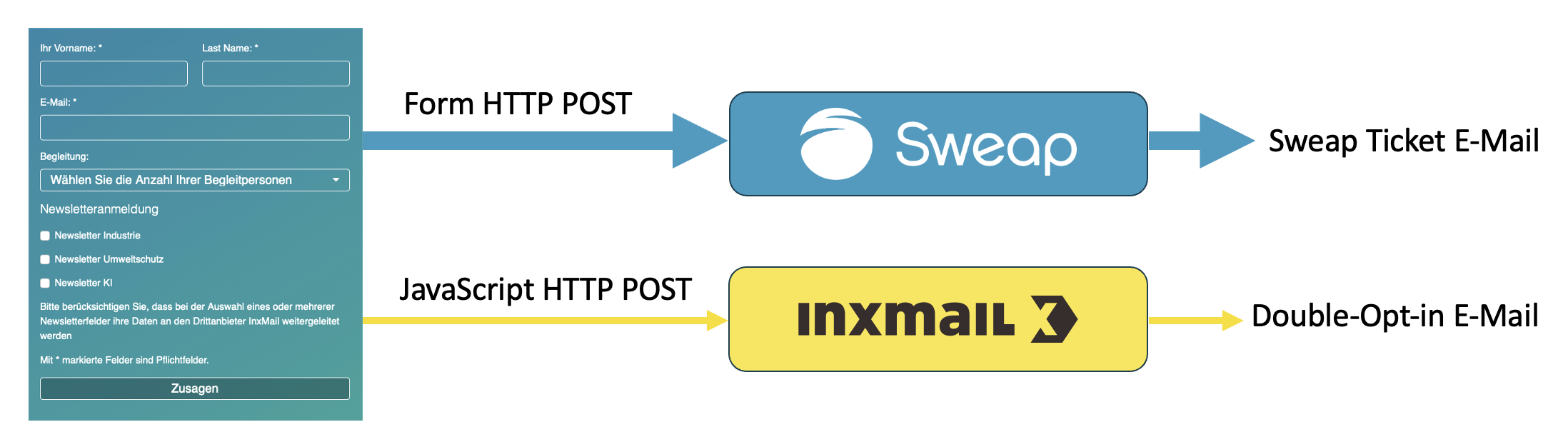
When a guest fills out and submits the registration form, two things happen simultaneously:
- The newsletter data (email address, selected mailing lists) is sent via JavaScript directly to Sweap's Newsletter Connector.
- The registration data is transmitted to Sweap as usual - the guest receives their confirmation/ticket email.
Our Newsletter Connector forwards the data immediately to the configured newsletter tool and triggers the configured double opt-in process there. The guest therefore receives a confirmation email immediately after registration - clearly linked to the sign-up in both content and timing.
Inxmail Setup: Step by Step
Inxmail is an established email marketing tool used by many Sweap customers - particularly in the IHK (Chamber of Commerce) sector. The direct connection via the Sweap Newsletter Connector makes it possible to add guests to InxMail mailing lists immediately upon event registration and trigger the double opt-in process. Here you'll learn how to connect Inxmail with Sweap.
1. Technical Setup of the Newsletter Connector
We need a few pieces of information for this. We're happy to help you obtain them - simply contact Sweap Support. Specifically, these are:
- Client ID and Client Secret - ⚠ important: this data is sensitive. Please do not send it directly via email; use our encryption service instead, for example: https://passwords.sweap.io.
- The InxMail API URL / subdomain of your Inxmail instance.
- The various newsletters or newsletter topics that a guest should be able to sign up for. We need the respective identification keys or the name of the topic.
- The desired mapping between form fields and mailing lists.
- An optional source - this is sent along to Inxmail. By default, "Sweap" is transmitted here.
With this information, we can connect the newsletter for you and send you your Newsletter API key, which you'll need in the next steps. This usually takes a few days.
2. Setup Within Sweap
The newsletter integration is now embedded via a JavaScript code snippet in the Sweap registration pages. To do this, this part must first be added to "Custom Head HTML":
<script src="https://integration-connector.sweap.io/static/js/sweap-newsletter-client.js"></script>
Afterwards, you can configure the integration under "Custom JavaScript". There are several options here:
- There is only one newsletter, with no further topic subdivision
In this case, this simple snippet is sufficient:
sweap_addNewsletterTopics(
    "[YOUR NEWSLETTER INTEGRATION IDENTIFIER]", null);
- There is the same topic list for every event
In this case as well, a simple JavaScript snippet is sufficient:
const topics = [
    "One topic",
    "Another topic",
    "Something entirely different"
];

sweap_addNewsletterTopics(
    "[YOUR NEWSLETTER INTEGRATION IDENTIFIER]",
    topics
);
- You want to offer a different topic list for each event
In this case, you can proceed as in option 2 and adjust the topics manually. However, there is also the option of using event tags for this. To do this, choose a prefix and create an event tag for each topic, for example:inx:Training,inx:Marketing,inx:General(here the prefix would beinx:). Now configure the JavaScript snippet as follows:
// This code can be used if event tags are created in combination with a topic prefix
const topics = ["{{ event.tags | map: "name" | join: '","' }}"];
const config = { topicPrefix: "inx:" };

sweap_addNewsletterTopics(
    "[YOUR NEWSLETTER INTEGRATION IDENTIFIER]",
    topics,
    config);
You can also adjust the design, for example by inserting this code in the "Custom CSS" field:
.sweap-module-simpleForm .simpleForm .form-group label.form_newsletter_topics_label {
    font-size: 1.5rem;
}

.control-label.form_newsletter_topics_helper_text {
    font-size: 0.875rem;
    color: #6A6A6A;
}
3. Customizing Texts
You have the option to customize the texts before and after the checkboxes. To do this, the following values can be added to the configuration (in the example "config"):
title: A title above the checkboxes ("Label")subtitle: An optional text directly below the title, above the checkboxeshelperText: An optional text below the checkboxes
Beispiel:
// This code can be used if event tags are created in combination with a topic prefix
const topics = ["{{ event.tags | map: "name" | join: '","' }}"];
const config = {
    "topicPrefix": "inx:"
    "title": "Would you like to subscribe to the newsletter?",
    "helperText": "I agree that my data provided above may be processed for the purpose of sending me information by email about the selected topics. My consent is given voluntarily. I can revoke my consent at any time for the future by phone, by email to <a href=\"mailto:einwilligung@example.org\">einwilligung@example.org</a>, or by post. For further information on the processing of your personal data, please refer to our privacy policy.",
};

sweap_addNewsletterTopics(
    "[YOUR NEWSLETTER INTEGRATION IDENTIFIER]",
    topics,
    config);
4. Publishing and Testing the Form
After configuration, the form can be checked with a test registration:
- Does the data arrive correctly in the newsletter tool?
- Is the double opt-in process triggered?
- Is the ticket email still being sent as usual?
Frequently Asked Questions
What happens if a guest doesn't tick a newsletter checkbox? No data transfer to the newsletter tool is triggered. The registration proceeds entirely as normal.
Can I connect multiple newsletter tools at the same time? Currently, the connector supports one tool connection per event. If needed, please contact the Sweap team.
When does the guest receive the double opt-in email? Immediately after submitting the registration form - with no delay. This ensures a clear association between the email and the registration.
Is the integration GDPR-compliant? Yes - consent is obtained transparently in the form, and the double opt-in process meets the requirements for legally compliant email marketing. The notice text in the form must indicate that data is being shared with a third-party provider.